 4.9/5 RATING | 227+ ENGINEERS TRAINED | FOR SIMATIC WINCC LEVEL 1 GRADUATES
Take your WinCC skills from "I know the basics" to "I can handle any complex project" - redundancy, server-client,
SQL integration, and more.
![]()
 Create professional reports in under 30 minutes
 Create professional reports in under 30 minutes
![]() Build redundant SCADA systems for 99.9% uptime
Build redundant SCADA systems for 99.9% uptime
![]() Integrate SQL databases for advanced data handling
Integrate SQL databases for advanced data handling
![]() Design production-ready faceplates used in real factories
Design production-ready faceplates used in real factories
Master enterprise-level SCADA in 10 weeks.
 30-day money-back guarantee
Here's what you get when you join WinCC V7/V8 Advanced:
150+ Professional Video Lessons (5-15 min each)
150+ easy-to-navigate videos. This step-by-step training will guide you through the individual modules to achieve advanced knowledge of WinCC.
Ready-to-use templates and scripts
Use scripts, windows, and templates to bring your ideas to life in SCADA. You will receive faceplate templates, report layouts, scripts, and other documents needed to set up and run the advanced options in WinCC V7/V8.
Join a private group
WinCC V7/V8 Advanced students will help you and give you interesting insights into your WinCC problems.
Detailed instructions from A to Z
You will go through the process step by step - from connecting SCADA to the cloud, generating customized reports, to connecting to WinCC from a tablet/smartphone.
New content added regularly
New content added regularly — databases, reporting, and more. Course updated December 2025.
Lifetime access
$1,497 once - lifetime access (vs $2,500+ for one Siemens workshop).
No subscriptions. No renewals.
What people said about WinCC V7/V8 Advanced:
Real results from real engineers - see why this is the #1 rated WinCC Advanced course online.
4.9/5 from 108+ reviews
 25 DAYS TRANSFORMATION
"Thanks to you I'm progressing quickly in my career and I've caught the attention of the whole team. After 25 days, the world will gain a new SCADA engineer."
 First engineering job → Team standout in 25 days
 PAID BACK 100X
"Our plant computer failed and production stopped! I followed the course step-by-step. After 2 hours our machine was running again! The course paid for itself 100x in one emergency."
Production stopped → Fixed in 2h → Saved thousands €
 PROMOTION
"I showed my boss what I can do in SQL and reports after taking the advanced course. He was so impressed that I got promoted!"
Showed skills to boss → Got promoted
 CAREER SWITCH
"SCADA World courses helped me make the move from instrumentation engineer to automation engineer. The knowledge was beneficial during job interviews."
Instrumentation → Automation Engineer
 50% TIME SAVED
"The course saved me DAYS of work. I now finish my projects in HOURS. My colleague spent 2 days figuring out what I learned in 1 hour from the course!"
Days of trial-and-error → Hours of confident work
 VISIBILITY IN COMPANY
"Thanks to the SQL and Excel integration skills from the course, I can now generate reports for managers. This has significantly increased my value as an employee!"
New skills → Reports for managers → Career growth
25 DAYS TRANSFORMATION"Thanks to you I'm progressing quickly in my career and I've caught the attention of the whole team. After 25 days, the world will gain a new SCADA engineer."
First engineering job → Team standout in 25 days
PAID BACK 100X"Our plant computer failed and production stopped! I followed the course step-by-step. After 2 hours our machine was running again! The course paid for itself 100x in one emergency."
Production stopped → Fixed in 2h → Saved thousands €
PROMOTION"I showed my boss what I can do in SQL and reports after taking the advanced course. He was so impressed that I got promoted!"
Showed skills to boss → Got promoted
CAREER SWITCH"SCADA World courses helped me make the move from instrumentation engineer to automation engineer. The knowledge was beneficial during job interviews."
Instrumentation → Automation Engineer
50% TIME SAVED"The course saved me DAYS of work. I now finish my projects in HOURS. My colleague spent 2 days figuring out what I learned in 1 hour from the course!"
Days of trial-and-error → Hours of confident work
VISIBILITY IN COMPANY"Thanks to the SQL and Excel integration skills from the course, I can now generate reports for managers. This has significantly increased my value as an employee!"
New skills → Reports for managers → Career growth
 BETTER THAN UDEMY
"I did Udemy course for SCADA WinCC and also other online training, but this course gave most benefit. Lukasz is a SCADA consultant explaining practically how to solve a problem."
5+ years experience - chose SCADA World over Udemy
 LEGENDARY
"Lukasz, you are truly LEGENDARY! Your courses are incredibly detailed and well-structured. I'm already looking forward to your next advanced course!"
Endorsed by professional SCADA developer
 20-YEAR VETERAN
"Through 20 years of professional work I've gone through dozens of different courses, but this one really impressed me. Specific and on topic, material strong in content and very substantial."
Best course in 20-year career
 CUSTOM VIDEO SUPPORT
"When I got stuck, Lukasz recorded a CUSTOM VIDEO explaining my specific problem and sent it to me on WhatsApp! I've never seen an instructor do that."
Personalized WhatsApp video support
 LIVING RESOURCE
"The instructor replies to ALL questions and updates the course regularly with new content. This is not just a course you buy and get abandoned!"
Continuous support & course updates
 NEVER ABANDONED
"Lukasz tries to help whether by email or on the Discord group, 24h. You definitely won't find that someone will leave you with the material and say figure it out yourself."
24h support - never left alone
BETTER THAN UDEMY"I did Udemy course for SCADA WinCC and also other online training, but this course gave most benefit. Lukasz is a SCADA consultant explaining practically how to solve a problem."
5+ years experience - chose SCADA World over Udemy
LEGENDARY"Lukasz, you are truly LEGENDARY! Your courses are incredibly detailed and well-structured. I'm already looking forward to your next advanced course!"
Endorsed by professional SCADA developer
20-YEAR VETERAN"Through 20 years of professional work I've gone through dozens of different courses, but this one really impressed me. Specific and on topic, material strong in content and very substantial."
Best course in 20-year career
CUSTOM VIDEO SUPPORT"When I got stuck, Lukasz recorded a CUSTOM VIDEO explaining my specific problem and sent it to me on WhatsApp! I've never seen an instructor do that."
Personalized WhatsApp video support
LIVING RESOURCE"The instructor replies to ALL questions and updates the course regularly with new content. This is not just a course you buy and get abandoned!"
Continuous support & course updates
NEVER ABANDONED"Lukasz tries to help whether by email or on the Discord group, 24h. You definitely won't find that someone will leave you with the material and say figure it out yourself."
24h support - never left alone
What you'll find inside WinCC V7/V8 Advanced
 BONUS
BONUS
Free Sample Lesson (1 of 150+)
This is Lecture 7 from Module 5 (Historical Trends)
Full course: 10 modules, 150+ lessons, 25+ hours
Meet Your Instructor

Hi, I'm Luke
 Hi, I'm Luke
PLC, HMI, SCADA Engineer
I've spent 17 years building SCADA systems for real factories.
140+ projects. Companies like SEAT, SKF, FAURECIA, ThyssenKrupp trusted me with their automation.
Now I teach what I learned in the field — not from books,but from real projects with real problems. 140+ SCADA Systems Built
 Author: "SCADA: You Must Know It Before First Project"
 6+ Years Teaching (2,500+ Udemy Students, 500+ SCADA World Graduates)
 Platforms: WinCC V7/V8, Wonderware InTouch, FactoryTalk
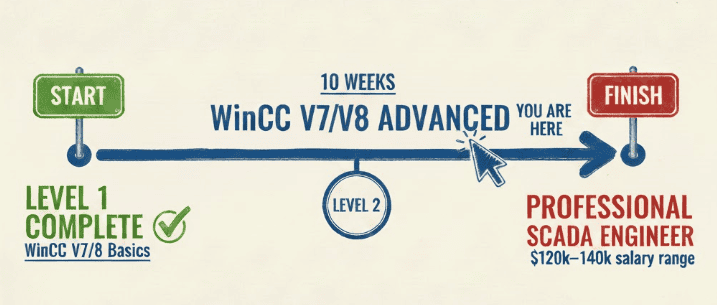
You will receive a Certificate
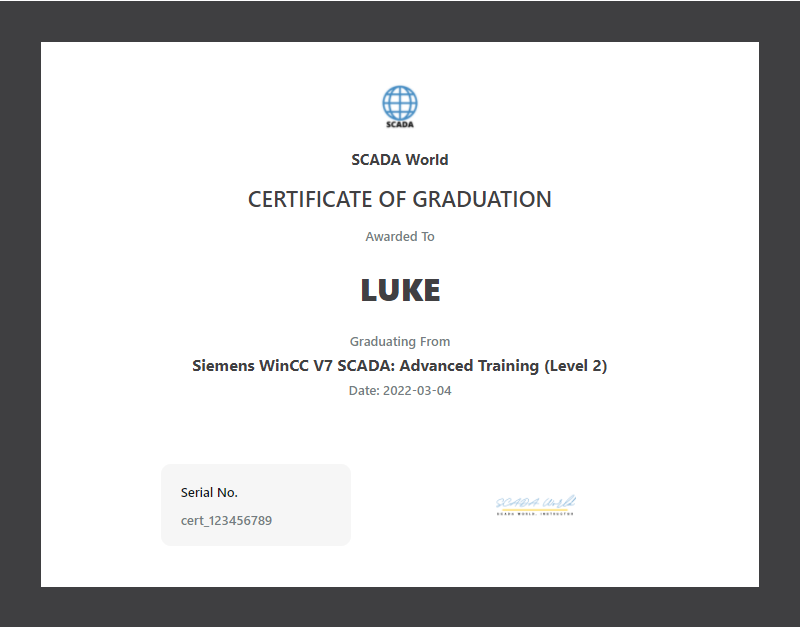
After completing the training, I issue a certificate of completion that you can enter in your CV. The document is issued in English.
Thanks to the certificate, the employer will know that you have mastered advanced SCADA techniques including SQL integration, reporting, and redundancy.
The certificate also carries information about your willingness to develop - after all, you have invested your private money to learn a skill that will be useful in your life - and this is a valuable feature on the labor market. This increases your chance of being invited to an interview.
Do I really need WinCC V7/V8 Advanced?
Maybe this knowledge can be achieved differently?
Of course, you can!
Here is a list of things you can do instead of enrolling in WinCC V7/V8 Advanced:
You can watch over 500 video episodes on youtube,
 You can watch over 500 video episodes on youtube,
 Read dozens of books, articles on Siemens tech support
Check everything out for yourself and try to do everything yourself
Join Siemens trainings in which each of them costs $2,500+ per workshop and does not bring ready-made solutions
Try and then let go at the first failure.
Or you can start this 10-module program and explore the advanced options available in WinCC V7/V8.
Before I show you the price, see what exactly you get when you join
WinCC V7/V8 Advanced:
Training - WinCC V7/V8 Advanced
Over 150 easy-to-navigate lessons to guide you through the entire process of building advanced SCADA elements.
A value of $ 1,997
Documents, Scripts, templates
You get ready-to-use scripts and report templates that you can use in your projects. Exactly the same that we use in our SCADA projects.
A value of $ 800
Work Analysis By Team
Get support and answers to your questions from Luke
A value of $ 500
Monthly Q&A with Luke
Get monthly updates with live session by ZOOM
A value of priceless
BONUS - DataGrid for SQL
You get ready to use the data grid for WinCC to display data from SQL.
A value of $ 1,000
BONUS - WinCC V7/V8 Redundancy MODULE
 BONUS - WinCC V7/V8 Redundancy MODULE
Completely new module for WinCC SCADA concerning redundancy: installation, modification and diagnostics.
A value of $ 997
BONUS - WinCC V7/V8 SERVER-CLIENT MODULE
Completely new module for WinCC SCADA concerning server-client applications: installation, modification and diagnostics.
A value of $ 997
BONUS - Oracle configuration
You get step-by-step instructions on how to connect WinCC with the Oracle database.
A value of $ 100
BONUS - MySQL configuration
You get step-by-step instructions on how to connect WinCC with the MySQL database.
A value of $ 100
Access on Demand - 24/7
Log in whenever you want, wherever you want, and always have access to the latest materials.
Transcribed videos: EN, DE, ES, FR
You can watch your training videos even when your kids are sleeping
Lifetime Access (Materials are being updated)
You only pay once and have access for as long as SCADA World exists. You are constantly receiving updated materials.
WinCC V7/V8 Advanced Private Student Group
Connect with others who develop applications in WinCC V7/V8. Take part in joint tasks, ask for help and help others.
Invoice
It's a simple thing but important. If you need offer for your company let me know: lukasz@myscadaworld.com
Satisfaction Guarantee
You have 30 days of warranty. Log in, check the lessons, and put them into practice. If you decide for any reason that WinCC V7/V8 Advanced is not for you, we will refund you 100% of the amount. We will only ask you for the reason for your cancellation after being returned to your account.
TOTAL VALUE: $7,691+
Choose Your Access
Start risk-free with $1 Trial or get lifetime access to WinCC Advanced
- All 150+ video lessons
- SQL, Reports, Redundancy modules
- Discord community access
- Cancel anytime
- All 150+ video lessons
- Lifetime access (no expiry)
- All future updates FREE
- Certificate of Completion
- 9 Live Zoom Q&A sessions
- BONUS: SQL scripts + Templates ($500 value)
- This course + ALL others
- WinCC L1, L2, VBS, FactoryTalk...
- 500+ total lessons
- New courses added regularly
- Priority support
money back
100%
30 day guarantee
100% Money Back Guarantee for 30 Days
Purchase With Confidence— It's Risk-Free!
If, for any reason, you don't like this amazing training, you can get a full refund anytime within 30 days after your purchase. If you have any issues, just get in touch with our friendly support team and they'll either help you out until you get the results you need or give you a swift refund.
Frequently Asked Questions
Can't find your answer? Email us at lukasz@myscadaworld.com
It's simple! Pay just $1 for 7 days of full access to the entire Advanced course. Watch all 150+ lessons, access SQL scripts, and join our Discord community. If you love it, do nothing — you'll be upgraded to the full course. If not, cancel anytime with one click.
No problem! You have a 30-day money-back guarantee. If the course doesn't meet your expectations, just email us and we'll refund you — no questions asked.
Yes! You can cancel your $1 trial at any time during the 7 days. No hidden fees, no obligations. You only pay if you decide to continue.
We accept all major credit cards (Visa, MasterCard, American Express), PayPal, and bank transfers. All payments are processed securely through Stripe.
Recommended but not required. This Advanced course assumes you know WinCC basics (creating screens, tags, alarms). If you've completed our Level 1 course or have equivalent experience, you're ready. If you're a complete beginner, we recommend starting with Level 1.
This course covers professional-level techniques:
SQL Integration: Connect WinCC to SQL Server, create custom queries, build historical data dashboards.
Advanced Reports: Design professional reports with Excel integration, automated scheduling, and custom templates.
Redundancy: Set up failover systems for 24/7 critical operations.
VBS Scripting: Advanced automation, dynamic graphics, and system optimization.
As a Lifetime member, you get access to 9 Live Zoom sessions with Luke (the instructor). These are interactive group calls where you can ask questions about specific problems, get code reviews, and learn from other students' questions. Sessions are recorded if you can't attend live.
Yes! Lifetime members receive the complete SQL Scripts + Templates package ($500 value). This includes production-ready SQL queries, report templates, Excel integration macros, and redundancy configuration files.
Forever! With the Lifetime Access option ($1,497), you buy once and have access for life. Plus, you get all future updates at no extra cost.
Yes! After purchase, you get immediate access to all 150+ video lessons across 10 modules. Learn at your own pace — no drip content, no waiting.
The course contains about 25+ hours of video content. Most students complete it in 6-8 weeks, studying 1-2 hours per day. But you have lifetime access — learn at whatever pace works for you.
Yes! The course platform works on any device — computer, tablet, or phone. Learn anywhere, anytime.
Yes! The course includes subtitles in English, German, Spanish, and French. Learn in your preferred language.
Absolutely! The course is regularly updated when Siemens releases new WinCC versions or features. All updates are free for lifetime members.
No, the course doesn't include a WinCC license. However, you can use the free trial version from Siemens to practice. WinCC V7/V8 has a generous trial mode that allows you to learn indefinitely.
For the SQL modules, yes. We show you how to install SQL Server Express (free) step by step. The free version is perfect for learning and even many production environments.
Both! The course covers WinCC V7 and V8. The interfaces are nearly identical, and all techniques work in both versions.
Any modern Windows PC will work. For SQL and redundancy labs, we recommend: Windows 10/11, 16GB RAM (8GB minimum), i5 processor or equivalent, and 50GB free disk space.
Absolutely! This course is specifically designed for engineers who want to go beyond basics. You'll learn enterprise-level techniques like SQL integration, redundancy, and advanced reporting that separate senior engineers from juniors.
Yes! You get personal instructor support plus 9 Live Zoom Q&A sessions. Ask questions directly via email, during live sessions, or join our Discord community with 400+ automation engineers.
Yes! After completing the course, you receive a Certificate of Completion specifically for WinCC V7/V8 Advanced. This demonstrates your expertise in SQL, Reports, and Redundancy — skills that employers value highly.
Senior SCADA specialists with advanced skills (SQL, redundancy, complex reporting) command premium salaries. In the US: $100,000 - $140,000+. In Europe: €70,000 - €100,000+. Companies pay more for engineers who can handle critical systems and database integration.
The Advanced course ($1,497) includes 150+ specialized lessons, 9 Live Zoom sessions, and the SQL Scripts + Templates package ($500 value). These are senior-level skills that directly translate to higher salaries and better projects. Most students see ROI within months through better job offers or project wins.
Ready to master advanced WinCC techniques?
Try the full course risk-free for just $1
Start My $1 TrialStill have questions?
Email us: lukasz@myscadaworld.com
Master Advanced WinCC
Join 227+ SCADA Engineers
Complete 10 comprehensive modules and gain enterprise-level skills
through our proven path for professional SCADA programmers.